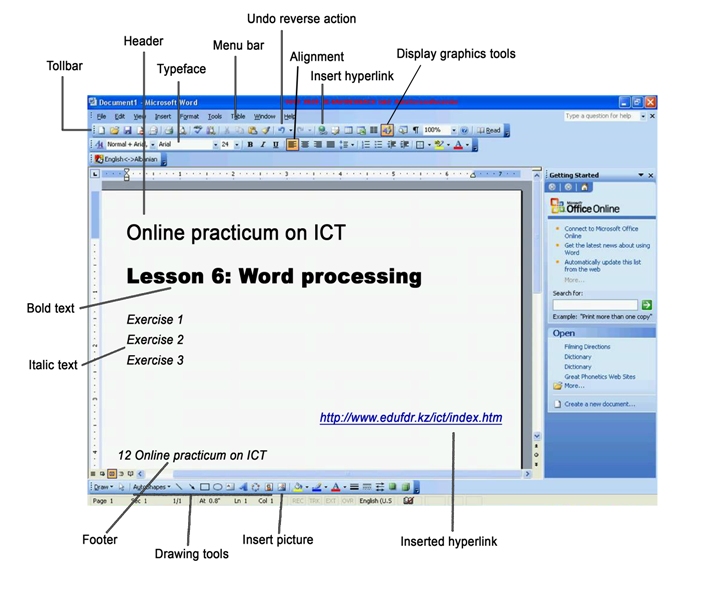
Complete these statements with a term from picture. Enter your answers in the gaps. When you have entered all the answers, click on the "Check" button.
Word processing
A word processor enables you to create a document, store it electronically on a disk, display it on a screen, modify it by entering commands and characters from the keyboard, and print it on a printer. The great advantage of word processing over using a typewriter is that you can make changes without retyping the entire document. If you make a typing mistake, you simply back up the cursor and correct your mistake. If you want to delete a paragraph, you simply remove it, without leaving a trace. It is equally easy to insert a word, sentence or paragraph in the middle of a document. Word processor usually support these features (and a few others). • Cut and paste: Allows you to remove (cut) a section of text and insert (paste) it somewhere else. • Find and replace: Allows you to direct the word processor to search for a particular word or phrase. You can also direct the word processor to replace one group of characters with another everywhere that the first group appears. • Word wrap: The word processor automatically moves to the next line when you have filled one line with text, and it will readjust text if you change the margins. • Print: Allows you to send a document to a printer to get hard copy. • Font specifications: Allows you to change fonts within a document. For example, you can specify bold, italics, and underlining. Most word processor also let you change the font size and the typeface. • Graphics: Allows you to include illustrations and graphs in a document. Some programs let you create the illustrations within the word processor; others let you insert a picture from a different program. • Headers, footers and page numbering: Allows you to specify customized headers and footers that the word processor will put at the top and bottom of every page. The word processor automatically keeps track of page numbers so that the correct number appears on each page. • Layout: Allows you to specify different margins within a single document and to specify various methods for indenting a paragraphs – how much space you leave between the margins and the paragraphs. • Merge: Allows you to marge text from one file into another file. This is particularly useful for generating many files that have the same format but different data. Generating mailing labels is the classic example of using merges. • Spell checker: A utility than allows you to check the spelling of words. It will highlight any words that it does not recognize. • Thesaurus: Allows you to search for synonyms without leaving the word processor. The line dividing word processor from desktop publishing systems is constantly shifting. In general, though, DTP applications support files control over layout and more support for full-color documents.
Find and replace font Indenting spell checker thesaurus toolbar word wrap